

A Browser Code Sandbox in One Block
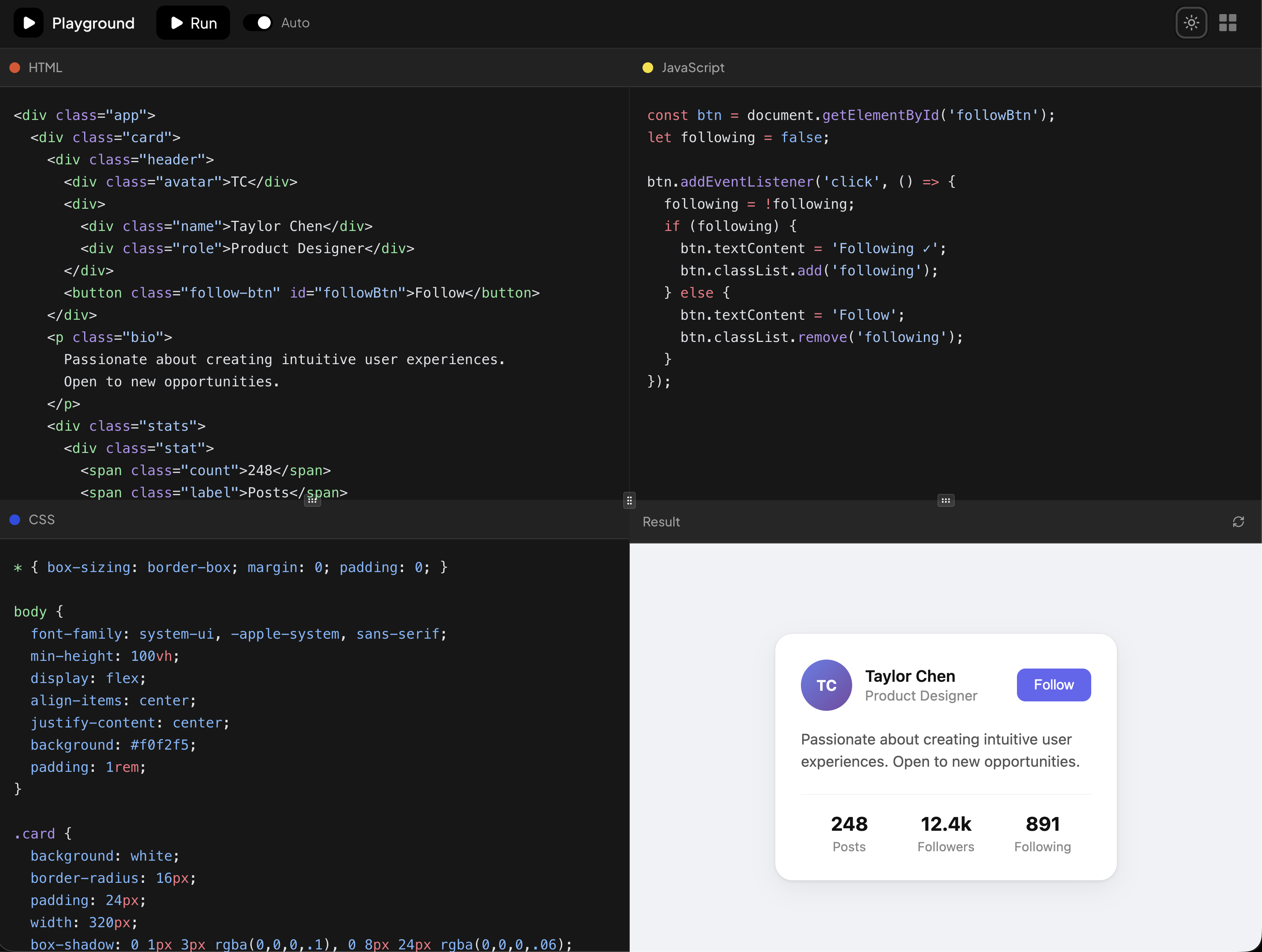
Code Playground is a self-hosted mini CodePen: three editors for HTML, CSS, and JavaScript beside a live result pane, with a Run button, layout switching, and its own theme toggle. Everything runs client side inside your app, no external sandbox service involved.
It belongs in developer education products, component documentation, technical interview tools, and CMS admin panels where editors tweak embeds. The default document is a small profile card with a working follow button, so the demo proves the JavaScript wiring immediately.
Shiki Highlighting Over a Plain Textarea
The editor is a transparent textarea layered over a Shiki rendered pre block, sharing identical font metrics so the caret lines up with the colored tokens. A module-level singleton creates the highlighter once with the github-dark and github-light themes and the three needed grammars, avoiding repeat WASM loads.
Scroll position syncs between the layers, and the highlighted markup gets its padding and line height patched inline so the illusion holds at any size. It is a lightweight alternative to embedding a full editor like Monaco when three languages are all you need.
Sandboxed Preview via iframe srcdoc
Pressing Run assembles a complete HTML document string, inlining the CSS in a style tag and wrapping the JavaScript in a try/catch, then hands it to an iframe through the srcdoc attribute with sandbox set to allow-scripts. User code therefore executes isolated from your application origin.
The preview pane adds a Result header with a refresh control and sits inside a ScrollArea, so long output scrolls without breaking the panel chrome built on the Resizable component.
Six Resizable Layouts
A dropdown LayoutSwitcher offers six arrangements: classic quadrant, columns, editors on the bottom, preview on the right, and two tabbed modes that collapse the editors into an HTML/CSS/JS tab strip. Each mode is composed from nested ResizablePanelGroup, ResizablePanel, and ResizableHandle elements, so every split is draggable.
The active layout is part of the store, meaning the choice survives navigation, and the tab strip marks each language with its conventional color dot for quick scanning.
Persistent Drafts With Zustand
State management runs through Zustand with the persist middleware, so the HTML, CSS, JavaScript buffers and the selected layout are written to localStorage and restored on reload. A reset action returns the sandbox to its default snippet when a user wants a clean slate.
The store also exposes an autoRun flag, letting you decide whether the preview rebuilds on every keystroke or only when Run is pressed, which is worth disabling for expensive scripts.
Editor Theming and How to Get the Code
A sun and moon toggle drives next-themes, and the editor swaps Shiki themes plus background and caret colors from a small THEME_CONFIG map, while the surrounding chrome relies on Shadcn UI tokens like bg-card and text-muted-foreground with Tailwind handling layout. Adjusting your CSS variables restyles the frame; swapping the Shiki theme names restyles the code.
Access follows the pro tier: anyone can play with the demo, and unlocking the source view together with the npm, pnpm, yarn, and bun CLI commands takes an All Access license. Once unlocked, the block installs in React form, or in the Vuejs and Svelte counterparts that were produced on shadcn-vue and shadcn-svelte respectively.