

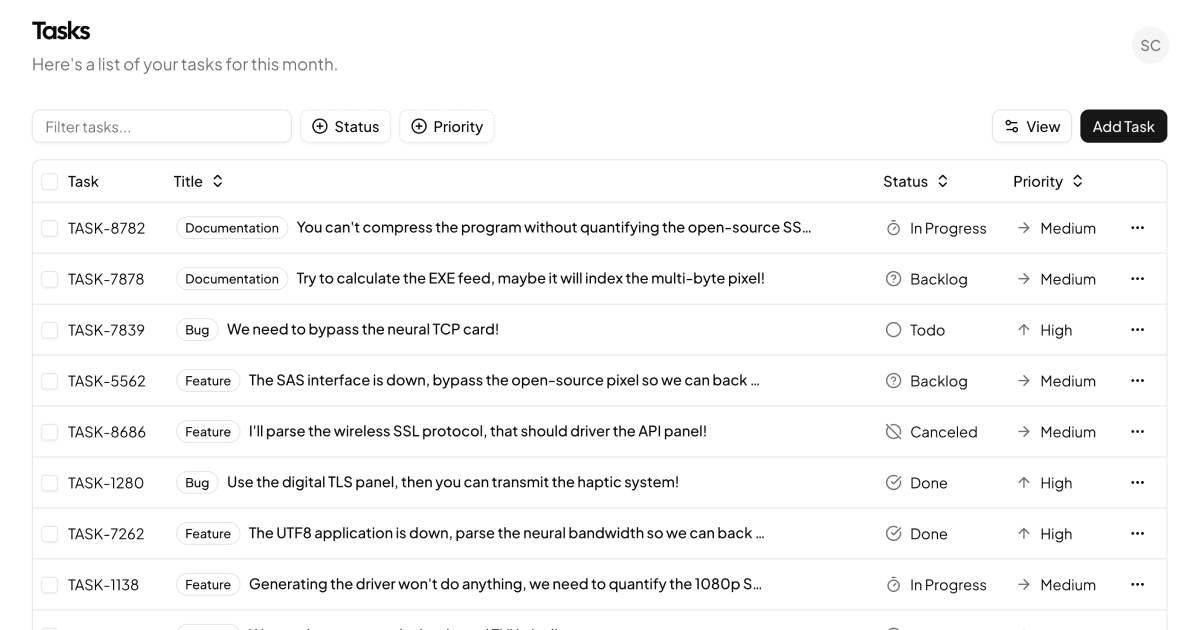
A Data Table Purpose-Built for Task Tracking
Tasks Table is a full-page task tracker centered on a production-grade data table. It lists issues and to-dos with id, title, status, priority, and label columns, then layers on the features that separate real dashboards from demos: a search toolbar, faceted filters for status and priority, sortable column headers, column visibility controls, row selection with checkboxes, per-row action menus, and complete pagination with page size selection. A welcome header with a user navigation dropdown frames it all as a finished dashboard page.
This is the table you build when a simple list stops scaling, and it arrives already built.
Beyond To-Do Lists: Where the Table Works
Issue trackers and sprint boards are the obvious home, but the architecture is content-agnostic. Swap the columns and the same table manages support tickets, content pipelines, orders, or user records. The faceted filter pattern, counting matches per status and priority inside a searchable popover, is particularly reusable anywhere users slice data by category.
For the drill-down side of the workflow, pair each row with a task detail page so clicking an issue opens its subtasks, files, and discussion.
TanStack Table, Zod, and the Rest of the Stack
Table logic runs on TanStack Table, the headless standard for React tables. Sorting, filtering, pagination, visibility, and selection are all TanStack state, while every rendered pixel stays under your control through Shadcn UI components and Tailwind classes. Column definitions live in their own file, so reshaping the table for your data means editing one array.
Data enters through a server component that reads a JSON file and validates it with a Zod schema before rendering, a pattern worth keeping when you swap in a database, since it guarantees the table never receives malformed rows. The UI layer composes Shadcn UI Table, Input, Badge, Checkbox, Button, Select, Separator, Popover, Command, DropdownMenu, and Avatar components across a set of small, reusable data-table building blocks: toolbar, column header, faceted filter, view options, row actions, and pagination.
Theming the Table
Dense data views live or die on contrast, and the block handles it entirely through design tokens. Row borders, header text, muted cell values, selected row highlights, and badge colors all read the CSS variables in globals.css, so the table restyles with your palette and inherits dark mode from the dark token set automatically.
Density is a Tailwind adjustment: tighten cell padding classes for an ops-style compact view or loosen them for touch screens, without touching the table logic.
From Install to Live Data
The shadcn CLI command at the top of the example page installs the whole block, table primitives included, with npm, pnpm, yarn, or bun; the code tab offers the same files for manual copying. Tasks Table is a pro block, so both unlock with an All Access plan, outlined on the pricing page.
Going live means replacing the JSON read with your own data source, validated through the existing Zod schema, and optionally moving filtering and pagination server-side, which TanStack Table supports through its manual modes. The block also ships in Vuejs and Svelte versions built on the shadcn-svelte and shadcn-vue ports, each powered by the TanStack Table adapter for its framework.