

What Counts as a Playground Block?
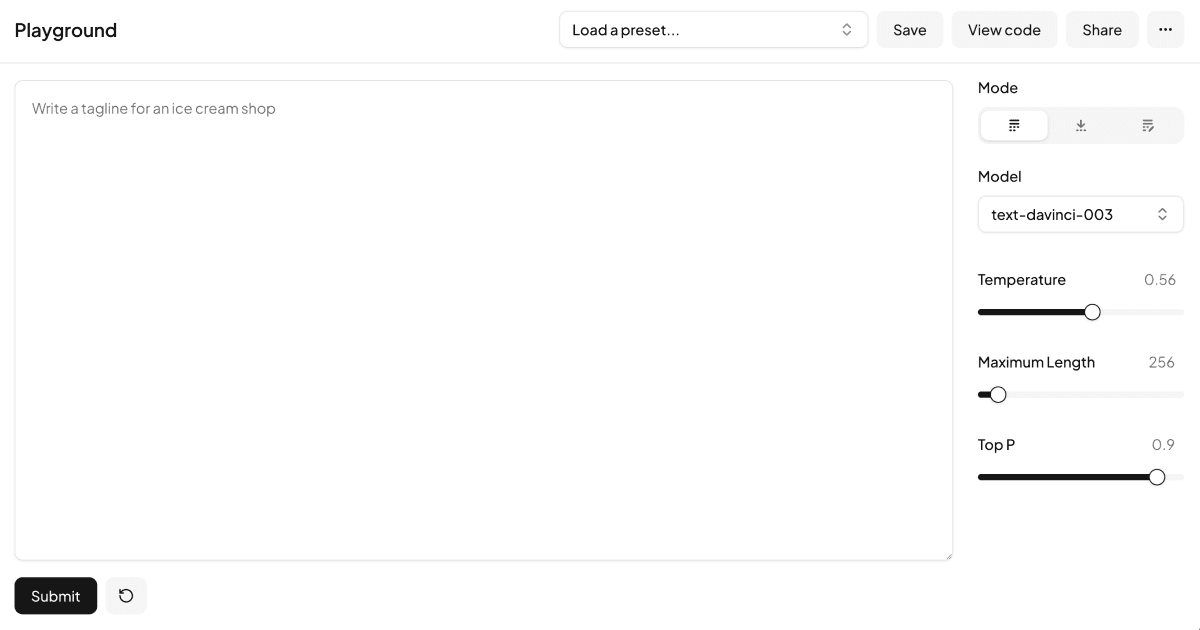
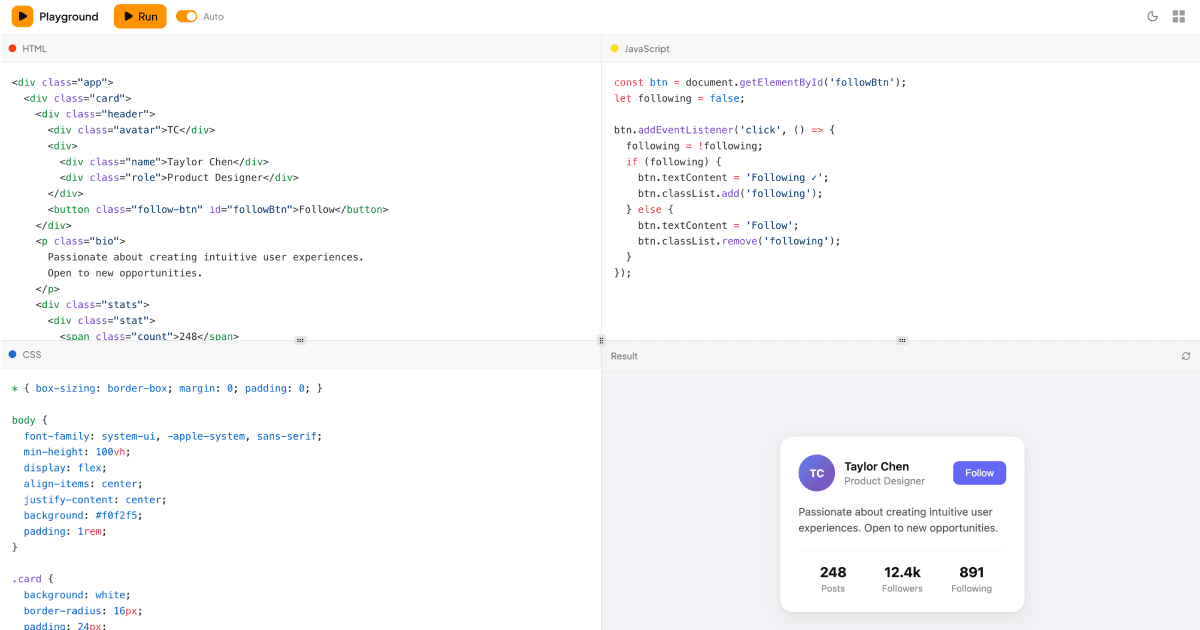
A playground is an interactive workspace where a person tweaks inputs on one side of the screen and watches results appear on the other. This collection packages that pattern as two ready to use Shadcn UI blocks: an AI prompt playground modeled after LLM tuning interfaces, and a code playground that runs HTML, CSS, and JavaScript in a live preview. Both are full page layouts built with Tailwind, so they behave like small applications rather than isolated widgets.
The two blocks share a design language but solve different problems, which makes the collection a useful starting point whether you are building developer tooling, an AI product surface such as an AI chat companion, or an internal experimentation console.
Two Variants, Two Jobs
The Playground block reproduces the classic prompt workbench. Shadcn UI tabs switch between complete, insert, and edit modes, a large textarea takes the prompt, and a settings sidebar holds a model selector, temperature, maximum length, and top-p sliders. Hover cards explain what each parameter does, and preset controls let users save, load, share, and delete configurations through dialogs, popovers, and a confirmation alert dialog. Model and preset options come from small local data files, so swapping in your own catalog is a one file change.
The Code Playground is a front end sandbox instead. Three editors for HTML, CSS, and JavaScript sit next to an iframe preview that re-renders automatically about half a second after you stop typing. A layout switcher moves between a classic grid, column arrangements, and tabbed modes, and the whole thing collapses into a stacked tab layout on mobile. It is the variant to reach for when you want users to write and run real code, for example in documentation, education platforms, or component demos.
How the Playgrounds Work Internally
Both blocks are written in React with TypeScript and styled entirely with Tailwind utilities. The prompt playground leans on Radix backed Shadcn UI primitives: Tabs, Slider, HoverCard, Popover, Command for the searchable model list, Dialog, AlertDialog, DropdownMenu, Switch, Textarea, and Button, with toast notifications provided by sonner.
The code playground adds heavier machinery. Panel sizes are handled by the Shadcn UI Resizable component, editor state lives in a Zustand store with the persist middleware so code survives page reloads, and syntax highlighting comes from Shiki. A theme toggle wired to next-themes flips the sandbox between light and dark without touching the rest of your app.
Adjusting the Look of the Playground
Neither block hardcodes colors. Surfaces use tokens like bg-background and bg-muted, text uses text-foreground and text-muted-foreground, and interactive elements inherit primary and accent from your globals.css. Because everything resolves through CSS variables, restyling the playgrounds means editing one set of token definitions rather than hunting through component files.
Dark mode works the same way: the tokens swap when the dark class is applied, so sliders, editors, and preview chrome all follow your theme automatically. Spacing, radius, and typography are plain Tailwind classes you can adjust inline.
Install It With the Shadcn CLI
Each playground page shows a shadcn CLI command at the top that registers the block in your project, with npm, pnpm, yarn, and bun variants. The command pulls the block files plus any missing Shadcn UI components into your configured paths. Alternatively, open the code tab and copy the files by hand: the entry page, the component folder, and, for the code playground, the Zustand store.
The AI prompt Playground is a free block, so its source is viewable and copyable by everyone. The Code Playground is a pro block, and its code tab and CLI install unlock with an All Access plan, detailed on the pricing page. Both blocks ship in React, Vuejs, and Svelte versions, with the Vuejs and Svelte editions built on the shadcn-vue and shadcn-svelte ports, so the same workspace drops into whichever stack you run.
After installing, wire real behavior in: point the prompt submit handler at your LLM API, replace the local model and preset data with your own, or extend the sandbox with extra languages. The UI layer is already done.