

A People First Activity Log Grouped by Day
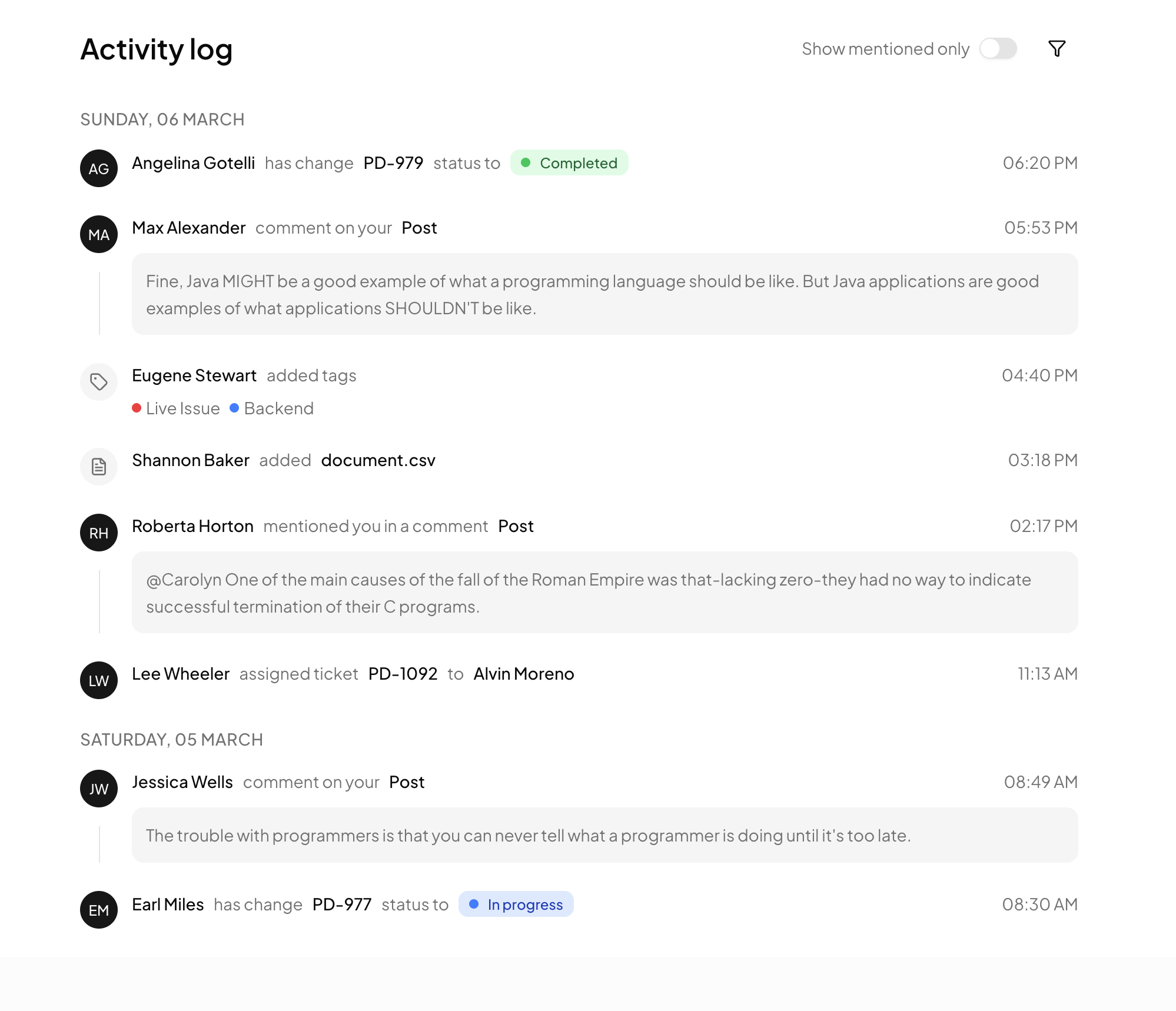
Activity Feed is a full page block that presents a team's recent history the way humans recall it: by day, by person, by action. As the component maps over its events, a small currentDate tracker detects when the date changes and injects an uppercase header like SUNDAY, 06 MARCH before the next group. The result reads as a diary of the workspace, with eight demo events spanning status changes, comments, tags, file uploads, mentions, and ticket assignments.
Avatars for People, Icon Bubbles for System Events
Every row leads with a visual anchor chosen by event type. Human actions show a Shadcn UI Avatar with an image when available and an initials fallback on the primary token otherwise, while tag and file events swap in a muted circle holding a lucide Tag or FileText icon. A one pixel border colored line runs down behind the anchors to stitch the rows into a continuous thread, and all sizing steps up from h-6 to h-8 at the md breakpoint for comfortable desktop density.
Status Badges, Tag Dots, and Quote Boxes
Three small systems carry the feed's meaning. Status changes render a Badge whose tint and leading dot come from a getStatusColor helper, green for Completed, blue for In progress. Added tags appear as colored dot plus label pairs via getTagColor. Comments and mentions expand into rounded bg-muted quote boxes beneath the actor line, giving long text room without breaking the rhythm of the timeline. Each pattern is a tiny function or conditional block, easy to extend with new colors or event shapes.
Filtering Affordances in the Header
The Activity log title row ships with two controls: a Show mentioned only Switch and a ghost variant filter Button with an icon. They are intentionally presentation ready rather than prewired, so you decide whether filtering happens client side over the array or server side in your query. On phones the header stacks vertically and the controls stay reachable, thanks to a flex-col to flex-row responsive swap.
Where a Feed Like This Belongs
This block fits products where many actors touch shared objects: project management tools, ticketing systems, CRM records, and admin audit trails. It also pairs naturally with the notifications blocks, the feed being the permanent record and notifications being the interruptive slice of the same event stream. Anywhere the question is who did what, and when, this component is the answer surface.
Premium Tier, Theming, and Setup
Activity Feed is one of the Premium blocks, so an All Access plan opens both the code view and the CLI route. The fastest setup is the shadcn CLI snippet displayed above the demo, offered in npm, pnpm, yarn, and bun forms, though the unlocked code tab supports direct copying too. Styling rests on Tailwind utilities over foreground, muted, and border tokens, so the layout adapts once your app configures dark mode; only the semantic status and tag hues are literal classes you may want to map to your own palette. If your stack is not React, the same feed exists for Vuejs and for Svelte, each built on the respective shadcn-vue and shadcn-svelte component ports.