

Multi Step Forms, Defined
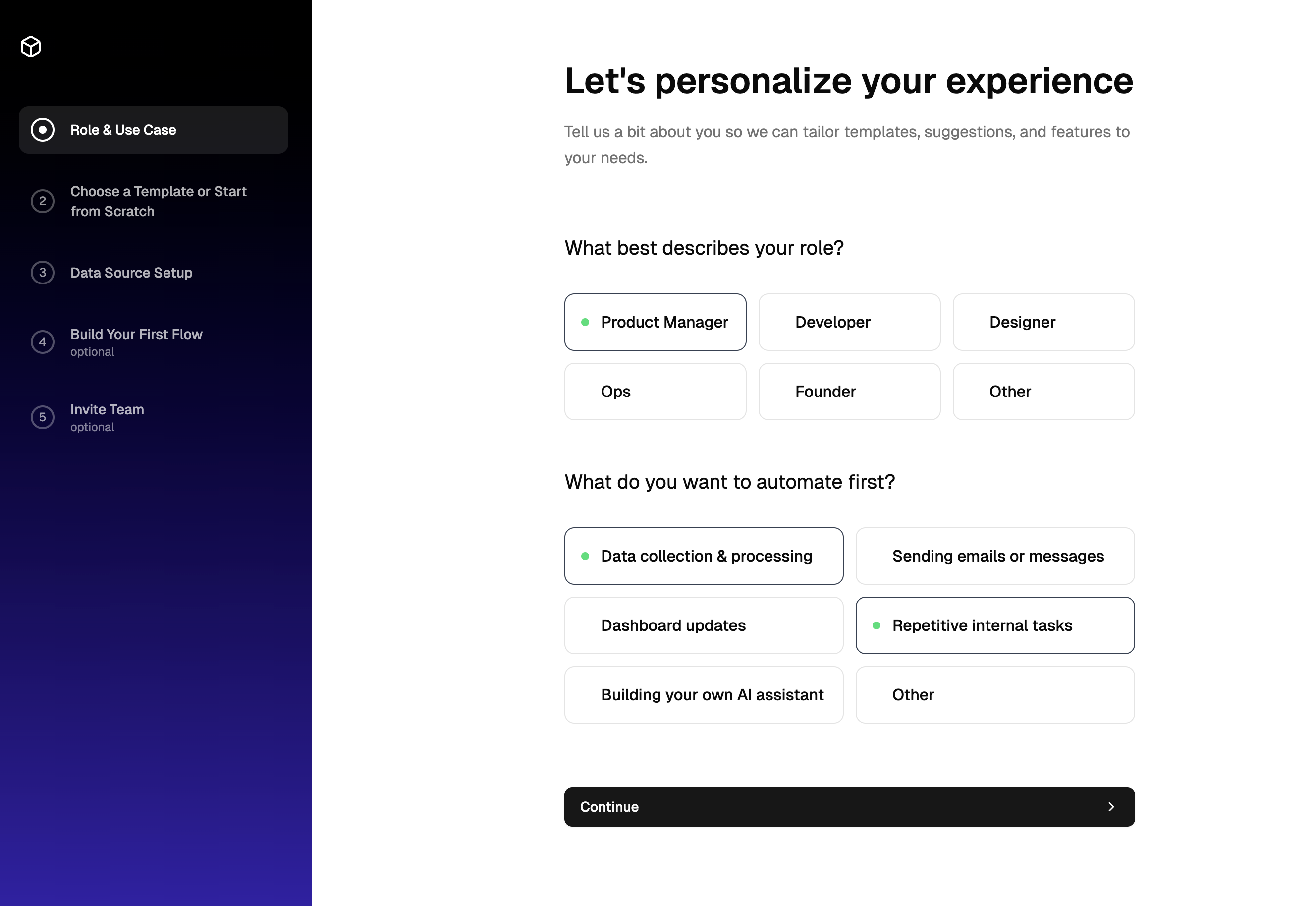
A multi step form breaks one long questionnaire into a sequence of focused screens, each asking for just enough to keep momentum. This block implements a five-step product setup wizard: choosing a role and use case, picking a template, connecting a data source, naming a first automation flow, and inviting teammates, with the last two steps marked optional.
A dark gradient sidebar tracks the journey, showing completed steps with green check circles, the current step with a highlight, and optional steps with a badge. Users can click back to any step they have already finished, which makes reviewing earlier answers painless.
When to Split a Form Into Steps
Wizards shine wherever a single form would feel like a wall: product onboarding, workspace configuration, checkout flows, project creation, insurance quotes, and account applications. Splitting reduces perceived effort and lets you validate as you go instead of rejecting a giant submission at the end.
The pattern sits next to two close relatives in this collection. Onboarding flows apply the same stepped structure specifically to account signup, and survey forms use it to pace questionnaires. If your steps collect setup decisions rather than answers, this block is the right starting point.
How the Wizard Is Built
The page is a React client component holding two pieces of state: the current step index and the step metadata array. Navigation is a single goToStep function that marks earlier steps complete and moves the highlight, with continue and back handlers delegating to it. Each of the five step screens is its own component managing its own inputs with local useState, so adding, removing, or reordering steps means editing one array and one component list.
The steps use Shadcn UI buttons, inputs, labels, textareas, and badges, with lucide-react icons for the selectable option tiles, such as REST API, database, spreadsheet, and cloud storage choices on the data source screen. On small screens the Tailwind layout hides the sidebar entirely and pins a row of progress dots with a step counter to the bottom of the viewport, so mobile users always know where they are.
Make It Match Your Brand
Form surfaces follow the Shadcn UI token system: backgrounds, borders, muted helper text, and primary buttons all resolve from the CSS variables in your globals.css, so your palette and radius apply automatically. The block honors your theme in both dark and light mode without additional wiring.
The sidebar's black-to-indigo gradient is the one intentionally expressive element, written as plain Tailwind classes so you can swap it for your brand gradient, a flat brand color, or a token-based background in seconds. Step titles and optional flags are data, not markup, which keeps copy changes trivial.
Bringing the Wizard Into Your Codebase
Install through the shadcn CLI command at the top of the example page, with npm, pnpm, yarn, and bun variants, or copy the page and its six step components from the code tab. This is a pro block, so source access and CLI installs unlock with an All Access plan via the pricing page.
The same wizard ships in React, Vuejs, and Svelte versions, the latter two building on the shadcn-vue and shadcn-svelte ports. To productionize it, lift each step's local state into your preferred store or form library, submit the collected answers in the final step's handler, and gate the continue buttons with whatever validation your flow requires.